Enphase 101 Error: Microinverter PLC Communication Loss
Resolve Enphase Gateway error 101 (microinverters not reporting).
The IQ Gateway has lost communication with one or more rooftop microinverters over the electrical AC power lines (Power Line Communication failure).
Probable Causes
High electrical noise on AC home wiring generated by EV chargers, variable speed pool pumps, or cheap LED drivers.
Gateway installed on a different electrical subpanel located too far from the solar breaker landing lugs.
Tripped 20A Q-Cable branch circuit breaker in the Enphase Combiner box.
Diagnostic & Testing Steps
- •Enlighten app displays "Microinverters Not Reporting" with red cloud icon.
- •Envoy AP mode shows error 101; production data is missing for individual rooftop panels.
- •Rooftop microinverters may still generate power locally, but telemetry data is not updated.
Tools & Equipment Required
- ✓CAT III 600V Digital MultimeterMeasure AC grid voltage (230 VAC L-N, < 2 VAC N-PE) at Q-Cable termination branch.
- ✓Enphase Q-Cable Disconnect ToolRelease snap-lock sealing connectors on microinverter trunk cable.
- ✓3.5mm Slotted Terminal ScrewdriverTighten terminal screw connections in Envoy / IQ Gateway combiner box.
- ✓Wire Stripper & Ferrules CrimperRepair degraded AC branch field wire terminations.
- ✓Safety Glasses & Work GlovesEye and hand protection while inspecting solar AC electrical subpanel.
Fast Reset Sequence: Solar Inverter Safe AC/DC Shutdown & Reboot Sequence
Before unmounting panels or beginning diagnostic procedures, attempt this manufacturer reset to clear transient microcomputer lockouts:
- 1.Step 1: Switch OFF the dedicated AC circuit breaker at the main electrical distribution panel.
- 2.Step 2: Turn the rotary DC Disconnect Switch on the underside of the inverter to the OFF (0) position.
- 3.Step 3: Wait a minimum of 5 to 10 minutes to allow high-voltage DC capacitors to bleed down to 0V.
- 4.Step 4: Re-engage the DC disconnect first, followed by switching ON the AC breaker.
- 1
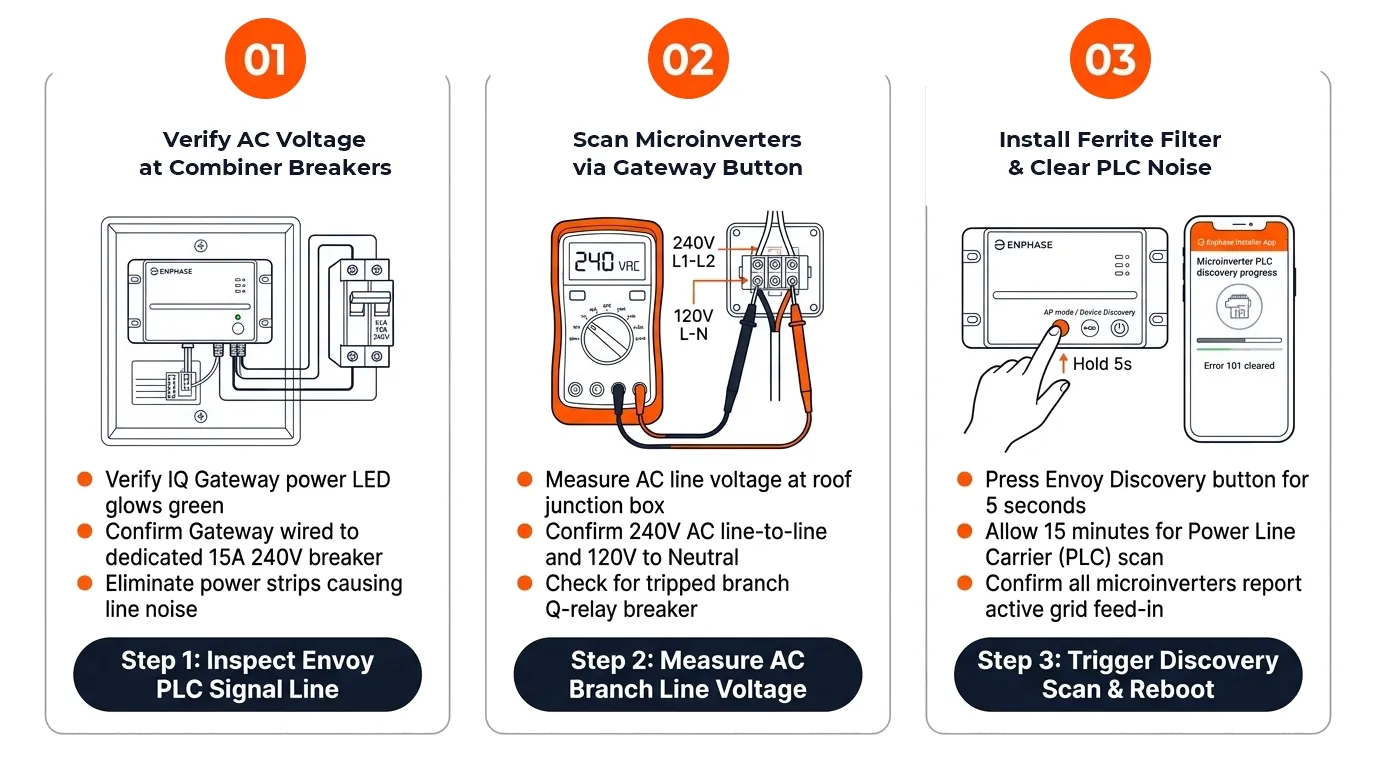
Step 1: Verify AC Voltage at Solar Combiner Breakers
[ ] DoneTest AC line-to-line voltage across each 20A solar branch breaker with a digital multimeter.
Verification:Reading measures between 230 VAC and 248 VAC across L1 and L2 on all active strings. - 2
Step 2: Perform Device Scan via Gateway Button
[ ] DonePress the Device Scan button (magnifying glass icon) on the Gateway faceplate for 1 second to initiate a fresh discovery scan.
Verification:Gateway LED flashes green during 15-minute network scan as missing microinverters register. - 3
Step 3: Install Ferrite Toroid Rings on Noisy Sub-Circuits
[ ] DoneLoop hot and neutral conductors of suspected noise-generating appliances (e.g. EV charger) through ferrite chokes.
Verification:Signal strength reaches 4 or 5 bars in Installer Toolkit; all microinverters report online.
Repair Solutions
Check 20A double-pole breakers in the IQ Combiner to confirm all solar branches are energized.
Install ferrite toroidal chokes on power lines feeding noisy loads to filter out high-frequency interference.
Relocate Gateway or install dedicated communication filter to isolate PLC signals.
Frequently Asked Questions
Are my solar panels still producing power during an Enphase 101 error?
Yes, microinverters continue generating power as long as the AC breaker is on; only the cloud telemetry data reporting is halted.
How long does it take for microinverter data to restore after clearing the error?
Microinverters store energy data locally in memory and will backfill historical production to the cloud over 2 to 24 hours once communication recovers.