Samsung SE Error: Membrane Keypad Short Circuit
How to fix Samsung microwave SE / 5E error code (shorted button).
The microwave control board detects a short circuit in the touch keypad membrane switch (key held down or stuck for more than 60 seconds).
Probable Causes
Internal silver-paste conductive traces on touch membrane shorted together by steam/humidity from range.
Dirt or grease buildup between ribbon cable contacts and control board header.
Defective membrane switch touch panel assembly.
Diagnostic & Testing Steps
- •SE or 5E error displayed on digital clock readout with continuous beeping.
- •Microwave controls become totally unresponsive.
- •Exhaust fan or cooktop light may turn on uncommanded.
Tools & Equipment Required
- ✓Phillips #2 Screwdriver & 1/4-inch Nut DriverRemove control panel rear housing screws to access membrane switch assembly.
- ✓Digital Multimeter (Resistance & Continuity)Test key matrix ribbon cable for shorted traces (stuck button resistance < 100 Ω).
- ✓99% Isopropyl Alcohol & Cotton SwabsClean ribbon cable gold-plated contact fingers and membrane connector socket.
- ✓Inspection FlashlightInspect flexible ribbon cable for micro-cracks or heat warping.
Fast Reset Sequence: Samsung Appliance Power & Keypad Reset
Before unmounting panels or beginning diagnostic procedures, attempt this manufacturer reset to clear transient microcomputer lockouts:
- 1.Press Power to shut down the front display console completely.
- 2.Unplug the appliance power cord from the electrical wall outlet.
- 3.While unplugged, press and hold both Power and Start/Pause simultaneously for 10 seconds to drain residual board capacitors.
- 4.Wait 3 minutes, restore electrical power, and run a Quick Rinse or Diagnostics cycle.
- 1
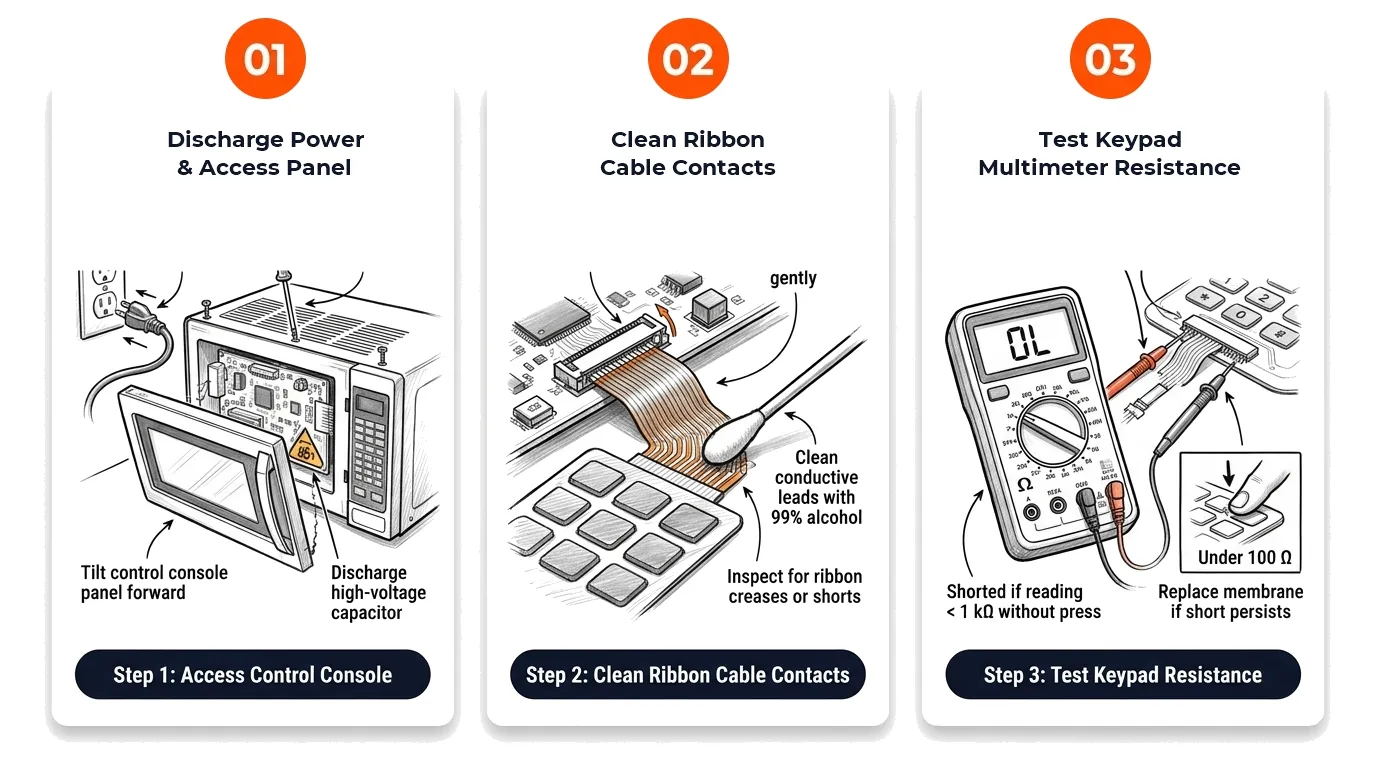
Step 1: Discharge Power & Access Panel
[ ] DoneUnplug unit, remove top exhaust vent screws, and tilt control panel forward to access touch ribbon cable.
Verification:Unit is de-energized and ribbon cable is visible. - 2
Step 2: Clean Ribbon Cable Contacts
[ ] DoneCarefully release ribbon cable latch, withdraw cable, and clean conductive fingers with 99% isopropyl alcohol.
Verification:Conductive traces are clean and free of grease deposits or hairline cracks. - 3
Step 3: Test Keypad Multimeter Resistance
[ ] DoneMeasure resistance across ribbon cable trace pairs: must read open circuit (infinity) when no button is pressed.
Verification:If any trace pair reads resistance while resting, replace the touch membrane panel.
Repair Solutions
Unplug microwave from 120VAC power source for 5 minutes.
Remove top vent grille and control panel assembly to access membrane ribbon cable.
Clean ribbon cable gold/silver fingers with isopropyl alcohol and pencil eraser.
Frequently Asked Questions
Are Samsung errors SE and 5E the same?
Yes, 5E and SE look identical on 7-segment digital LED displays and both designate a stuck touch keypad button.
Why do over-the-range microwaves get SE errors more often?
Steam and grease rising from the cooktop below penetrate the bottom seam of the touch panel and short the membrane layers.