Samsung LC Error: Base Pan Moisture Leak Detected
Clear Samsung dishwasher error code LC (leakage detected).
Leakage detection sensor active. The moisture sensor in the bottom metal pan detected standing water, activating the drain pump continuously to avoid floor flooding.
Probable Causes
Water overflow caused by using regular liquid dish soap instead of low-sudsing automatic dishwasher detergent.
Loose hose clamp on water inlet valve, circulation pump motor, or drain hose connection.
Torn tub door gasket or water leaking past bottom corner baffles.
Diagnostic & Testing Steps
- •Display flashes LC or LE error code with continuous beeping.
- •Drain pump runs non-stop, draining empty tub even when door is open.
- •Touch control panel does not respond to power button presses.
Tools & Equipment Required
- ✓Phillips #2 Screwdriver & FlatheadRemove bottom kickplate and access base leak sensor tray underneath tub.
- ✓Heavy Absorbent Sponges & TowelsThoroughly dry metal leak sensor contact pads in lower collection tray.
- ✓Inspection Flashlight & MirrorTrace source of water seepage around sump clamp and door bottom gasket.
Fast Reset Sequence: Samsung Appliance Power & Keypad Reset
Before unmounting panels or beginning diagnostic procedures, attempt this manufacturer reset to clear transient microcomputer lockouts:
- 1.Press Power to shut down the front display console completely.
- 2.Unplug the appliance power cord from the electrical wall outlet.
- 3.While unplugged, press and hold both Power and Start/Pause simultaneously for 10 seconds to drain residual board capacitors.
- 4.Wait 3 minutes, restore electrical power, and run a Quick Rinse or Diagnostics cycle.
- 1
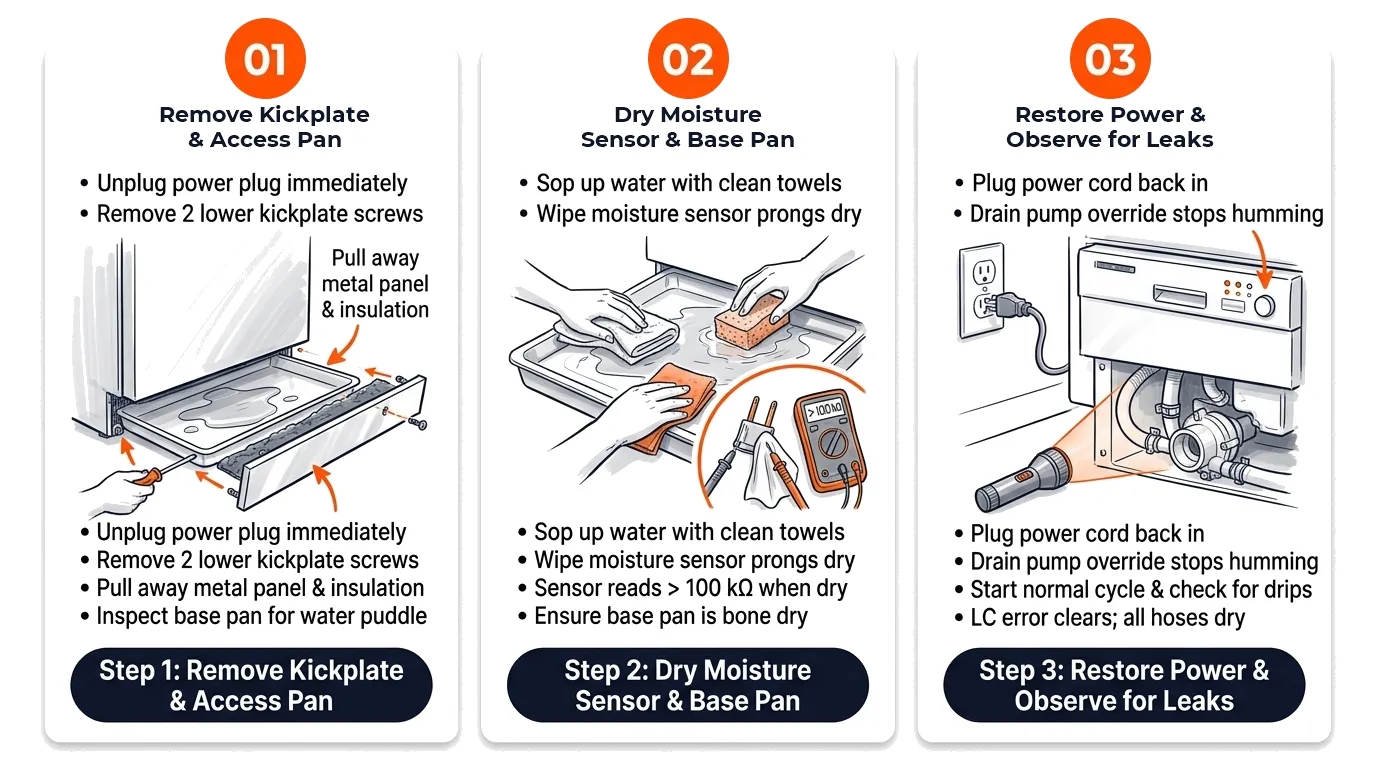
Step 1: Remove Kickplate & Access Pan
[ ] DoneRemove 2 screws holding the lower metal toe kick panel and insulation pad.
Verification:Metal bottom drain pan is accessible; inspect for water puddle beneath the wash tub. - 2
Step 2: Dry Moisture Sensor & Base Pan
[ ] DoneUse towels or a wet-dry vac to extract water. Wipe metal contacts of the moisture sensor until completely dry.
Verification:Sensor prongs are dry and free of mineral film; sensor resets once dried with no residual moisture bridge. - 3
Step 3: Restore Power & Observe for Leaks
[ ] DonePlug unit in (drain pump should no longer run). Start normal cycle and inspect water valve and hoses for drips.
Verification:LC error clears from display and machine cycles through wash and drain phases without leaking.
Repair Solutions
Unplug unit, remove lower front kickplate (toe kick), and inspect base drip tray.
Sponge out standing water and dry the two-prong moisture sensor with a clean cloth or hair dryer.
Run a short test cycle with flashlight to pinpoint water drip origin before reattaching toe kick.
Frequently Asked Questions
Why did my Samsung dishwasher show LC with no water on the floor?
The internal drip pan catches leaks before they reach your kitchen floor. Even 2 tablespoons of water contacting the sensor triggers the LC safety lockout.
Can excessive detergent suds cause an LC code?
Yes. Excessive foam escapes past door gaskets, drips into the lower base pan, and activates the leak sensor.